Create a quote or invoice from a job
The quickest way to invoice a single job is from the job itself.
-
Open the job and go to the Quote / Invoice tab.
-
Click Create quote / invoice. The job is linked automatically.
-
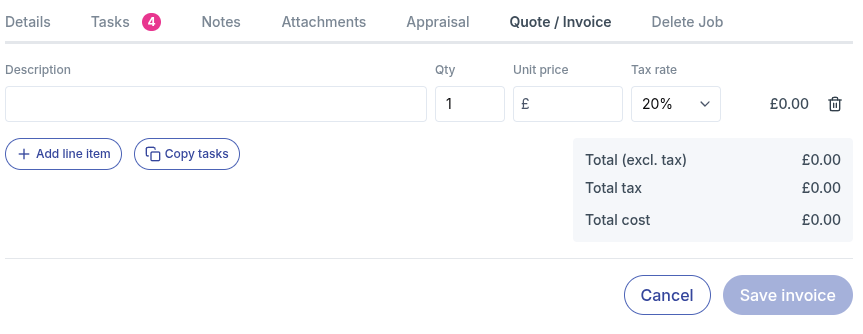
Add a line for each item of labour or parts. For each line, enter:
- Description
- Qty
- Unit price
- Tax rate: 20% or 0%
Already listed the work as tasks on the job? Click Copy tasks to add them all as lines in one go, then just fill in the prices. See Copy tasks onto an invoice.
-
Click Add line item to add more lines, or use the bin icon to remove one.
-
Check the totals. workauto shows the total excluding tax, the total tax and the total cost.
-
Click Save invoice.
The job must have a customer attached before you can create a quote or invoice for it.
If you try to close the job or switch tabs before saving, workauto will warn you so you don't lose your work.