Reference Glossary Jobs
Here you can find a glossary of terms/concepts used in workauto related to jobs.
Job
A job is a collection of tasks that need to be completed. Jobs can be assigned to technicians and have a status (e.g., "Active", "Draft").
Job Status
A job status indicates the current state of a job.
- Draft - this status can be used for jobs that you are quoting but not yet booked. They can also be used for fill in jobs that you want to complete later and don't want to put in the planner yet.
Use Draft status for quotes or jobs you're planning ahead — they won't appear on the planner until you're ready to book them in.
-
Booked - this status indicates that the job has been scheduled into the planner with a date and time.
-
Active - this status indicates that the job is currently being worked on.
-
On Hold - this status indicates that the job is blocked and cannot proceed until a specific issue is resolved. This might be waiting for parts, customer approval, or other dependencies.
-
Workshop Complete - this status indicates that the job has been completed in the workshop, it now just requires the front desk to sign off.
-
Job Finished - this status indicates that the job has been fully completed and all tasks have been finished. You can use tags to indicate that the job is invoiced.
Jobs with a status of Workshop Complete or Job Finished will appear in the Jobs Not Invoiced report until the Invoiced tag has been applied.
Task
A task is a single unit of work that needs to be completed. Tasks are either complete or incomplete. Tasks can be added to jobs and can have a description and estimated time to complete.
Tags
Tags are labels that can be added to jobs to help categorise and organise them. Tags can be used to indicate the type of job, the priority of the job, or any other relevant information.
-
Waiting - the customer will wait whilst the job is being completed.
-
Courtesy Car - a courtesy car has been provided to the customer whilst the job is being completed.
-
Urgent - the job is urgent and needs to be completed as soon as possible.
-
MOT - the jobs requires an MOT test (UK only).
-
Arrived - the customer/vehicle has arrived for the job.
-
Parts Picked - the parts required for the job have been picked from stock/arrived.
-
Invoiced - the job has been invoiced to the customer.
Job Reference
A job reference is a unique identifier for a job. Job references can be used to quickly find and reference jobs in the system. These are auto allocated by workauto.
Job Notes
Job notes are additional information or comments that can be added to a job. Job notes can be used to provide context or instructions for the job, or to record any issues or challenges that arise during the job. These can be made using the office view or in the techview.
Job Reminders
You can set up email reminders for jobs, if the customer has a valid email address. These reminders will confirm the job is booked and then remind the customer 48 hours before the jobs booked date.
Job Attachments
You can add attachments to jobs, such as images or documents. This can be useful for adding photos of the vehicle, or any relevant documents such as quotes or invoices. These can be added using the office view or in the techview.
Job Appraisals
We have a dedicated appraisals feature that allows you to create and manage job appraisals. There are two types of appraisals - a health check and a service check. You can add them to a job when creating or editing a job. They are completed in the Techview and once completed they are added to the job and can be viewed in the office view. They are then stored on the job and you can print or download them as required.
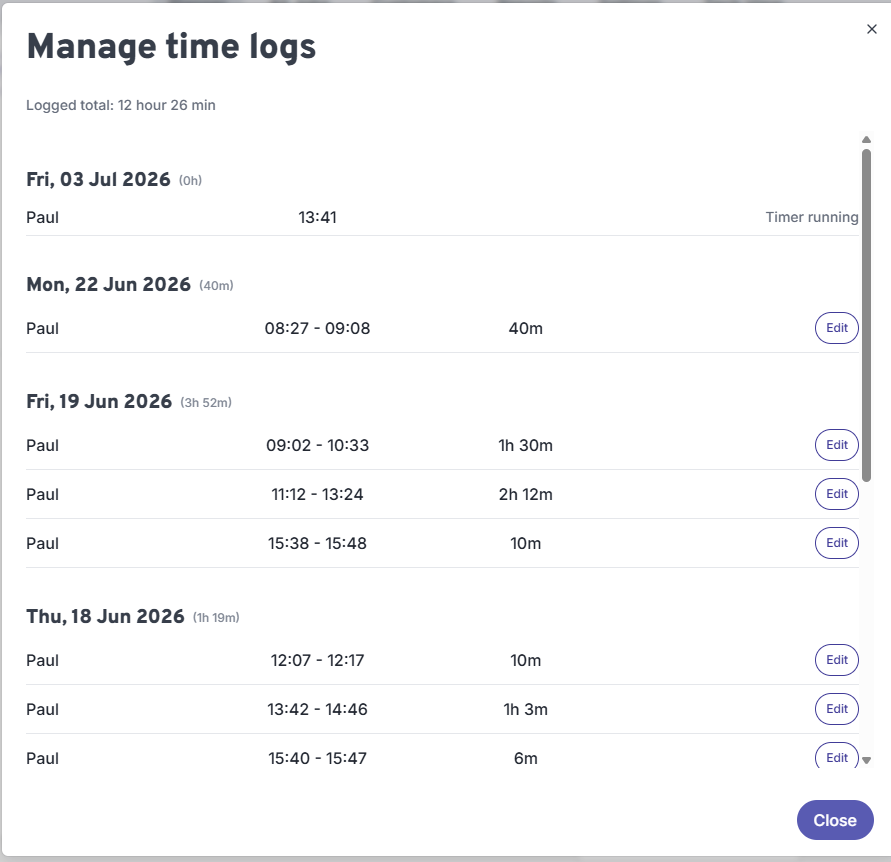
Logged Time
You can view all of the timelogs recorded on a job whether its in progress or completed. They are grouped by date, and you can check the time, duration, and the technician who recorded it. If you need to you can edit these as required by clicking on the edit icon.